
DBS checks
How to check progress on a DBS application as an admin
Use this when a DBS check has already been submitted and you want to see its current stage.
Track the application
- Open View Check StatusFind the applicant in the Client Portal.
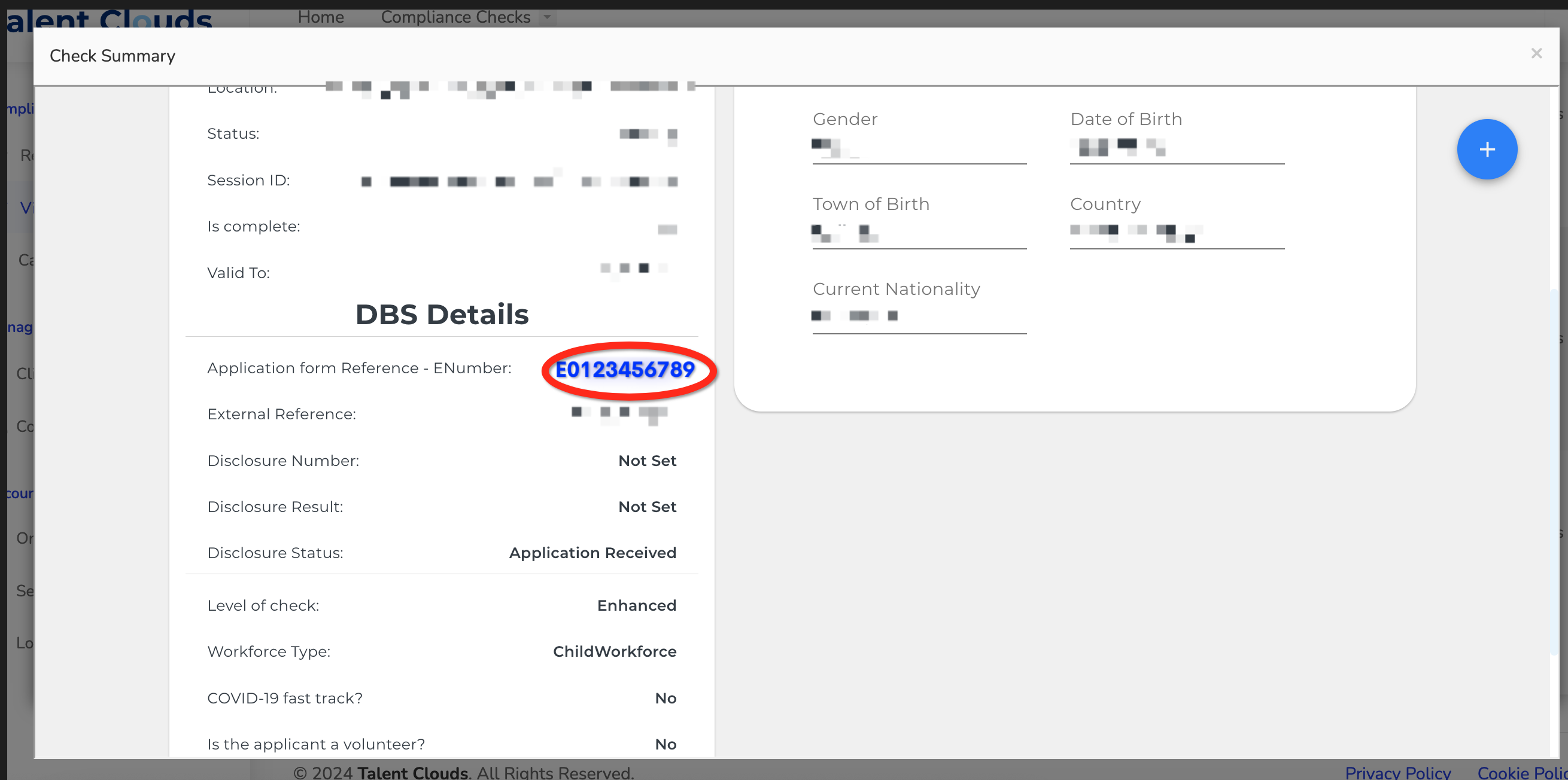
- Open the summaryUnder Actions, select View Check Summary.
- Find the ENumberLook for Application form reference (ENumber).
- Open DBS trackingSelect the blue ENumber link to open the official DBS tracking page.
What you will see
The tracker shows the current stage, such as whether the application is with DBS, undergoing police checks or complete.
Escalations and hardship
- Stage 4 over 60 days. We automatically escalate an application once it has spent more than 60 days in police checks. We cannot escalate before day 60.
- Applicant hardship. The applicant can call DBS on 03000 200 190 and quote their ENumber.
Applicant guidance
Keep the ENumber handy when speaking to DBS; it identifies the application.
Was this guide helpful?
Related guides
What is a DBS check and who is it for?Understand the four DBS check levels and the roles that may need them.How to request a DBS checkCreate a candidate, choose a role and send the right DBS or Right to Work check.How to submit a DBS application for countersigningReview the applicant's form, confirm identity and send it to the countersignatory.